

Safaricom Home Fibre service also known as Fibre To The Home (FTTH) is the use of Optical Fibre from a central point to connect multiple Users with the aim of providing them with High speed internet service. With the Safaricom home fibre you can have Fast, Reliable and Unlimited Internet from the comfort of your home which can be used by multiple devices without you having separate plans for all your multiple devices.

Safaricom home fibre
Safaricom Home Fibre Packages, Plans and Pricing.
The Safaricom Home fibre services features different plans to match all your needs and Wants depending on your need.

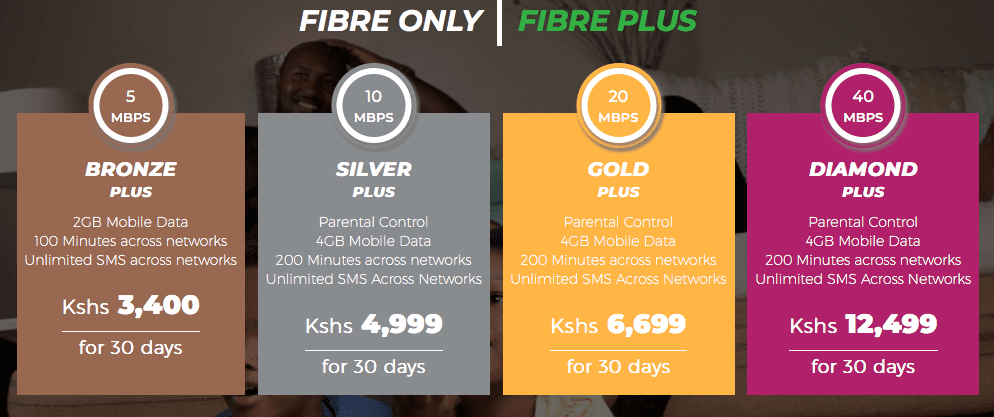
The Bronze/Bronze Plus Plan: This plan goes for 2900KSH for Bronze plan and 3400KSH for the Bronze plus plan and it comes with 5Mbps with with you can use to surf Basic web, Stream/Watch Videos in Standard definition and access social Media, Also with bronze plus plan you get 2GB of mobile data and 100 minutes of talk time across all Network.
The Silver/Silver Plus Plan: Goes for 3999Ksh for the Silver Plan while the Silver Plus Plan goes for 4999KSH and it comes with 10Mbps and allows you Surf the web and Stream Videos online in Standard definition, In Addition the Silver Plus Plan comes with 4GB of mobile data and 200 Minutes of talk time across all Network.
The Gold/Gold Plus Plan: it Goes for 5699KSH for the Gold plan while the Gold plus is 6699KSH and it comes with 20Mbps Speed and you can browse and surf the Web with Unlimited data usage and can also stream Video and Music in High Definition, the Gold plus plan comes with an additional 4GB of Mobile data, 200 Minutes Talk time and unlimited SMS.
The Diamond/Diamond Plus Plan: it goes for 11499KSH for the Diamond Plan while the Diamond Plus Plan goes For 12499KSH and it comes with 40Mbps which you can use to stream and surf the web at very high speed and can also stream video and Music in high definition mode and the Diamond Plus Plan comes with an additional 4GB and 200 minutes talk time and unlimited SMS.
How To Check For Safaricom Home Fibre Coverage And Get Connected
Coverage Check:
To know if there is Safaricom Home Fibre Coverage around your Home or estate simply dial *400*1# and Enter your Estate name or closest Landmark to know if the coverage is around Your Area.
To Get Connect to Safaricom Home Fibre
Simply Dial *400# and select the ‘Get Safaricom Home Fibre’ And You will be contacted within 24 hours by the Safaricom Home Fibre team, They Might request for some personal details Like Name, Valid Id number and Your Home Address after which you should receive a Sms on how to make payment.
Once Payment is completed you will either receive a sms or you will get a call telling you when the technical unit will be coming to install your Safaricom home fibre which could be a day or two.
How to Pay/Upgrade Your Safaricom Home Fibre SUbscription
Making Payment Using USSD:
- Dial *400#
- Select Manage Your Subscriptions (2)
- Select your Fibre package i.e. Fibre only or Fibre Plus
- Select My existing Account (2)
- Select subscription (1)
- Select Account
- Confirm the subscription and complete payment via M-Pesa
Benefit of Safaricom Home Fibre:
- Good for Streaming Video Online
- Multiple devices can be connected
- Unlimited Web Browsing and Streaming
- High Speed internet Service.
Safaricom Home Fibre Customer Services Details
If you would like to get in touch with their customer service, you can simply Dial 400 or alternatively you can send them an Email through ‘safaricomhome@safaricom.co.ke’
Note: Installation of Safaricom home fibre is free as you don’t need to pay for installation.
