


Facebook owned messaging application; WhatsApp has finally launched its very own disappearing message feature. Its users have been clamoring for this particular feature for awhile now. Especially since competitors like Snapchat, Telegram, Signal, Wickr, etc, already have disappearing or message self destruct type features.

For WhatsApp’s Disappearing messages feature, messages will disappear after a period of seven days (one week). This feature will apply to individual chats and group chats as well.
With no further ado, let’s get down to it!

How To Set Up The Disappearing Messages Feature On WhatsApp For Android
To activate the Disappearing Messages feature on your WhatsApp for Android mobile application, simply:
- Launch WhatsApp. Once there, tap on any individual chat or group chat of your choice.
- Once there, go to the specific individual or group chat’s setting, by tapping on the Individual chat name or group name.
- Next swipe through the available options until you get to Disappearing Messages.
- Once there, simply enable the option.
And that’s it! You are good to go.
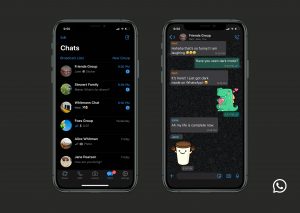
How To Set Up The Disappearing Messages Feature On WhatsApp For iOS
To activate the Disappearing Messages feature on your WhatsApp for iOS mobile application, simply:
- Launch WhatsApp.
- Once done, choose the particular individual chat or group chat that you would like to activate the Disappearing Messages feature in.
- Tap on the name of the individual chat or group chat.
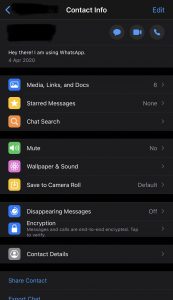
- Scroll down until you find the Disappearing Messages feature, just before the Encryption feature.
- Tap on the Disappearing Messages feature. You will be shown a pop up message, with a bit of information.
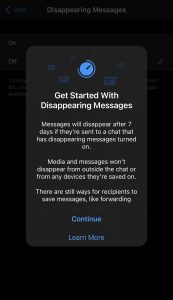
- Select ‘Continue’.
And that’s it! You are good to go.
Please keep in mind that all media and messages that have been saved outside the chat or on any device, will NOT be deleted. This means that all already media from chats that have already been downloaded to your device will remain on your device, even after the 7 day period. To disable this option on your WhatsApp Android mobile application, simply: Go to Settings -> Chats -> Chat Settings -> Media Visibility -> Disable this toggle.
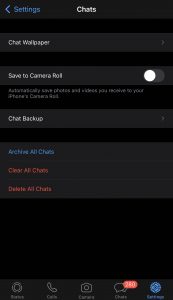
To disable said option on your WhatsApp iOS mobile application, simply: Tap on Settings -> Chats -> Save to Camera Roll. Once there, turn said option ‘Off’.
Another thing to note is that if you do not open the message(s) in a chat that has the Disappearing Messages feature activated, said message(s) will still disappear once the seven day period has elapsed. Said messages might still however get displayed in your notifications until of course, you open your WhatsApp mobile application.
In addition, whenever you reply to a message (quote said message) that will disappear in seven days, your reply or quoted message might remain even if the initial message you were responding to has been deleted.
Also, once a message that has been set to disappear is forwarded to a chat that does not have the Disappearing Messages feature enabled, said message will NOT disappear in the forwarded chat, after the seven day period.
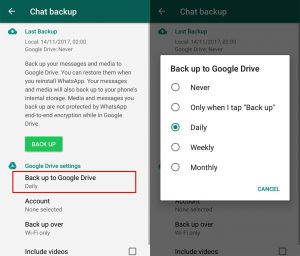
If you have created a WhatsApp chat backup within the seven day period before a disappearing message disappears, it will be part of your back up as well. Be rest assured however, that the affected messages will disappear as soon as you restore the backup.
While the new feature is a welcome addition, as with all things in life, there is still room for improvement. For example, a number of mobile applications with similar feature, allow their users to customize said features down to specific preferences as opposed to an On and Off button.
WhatsApp can also in the future as an upgrade to its Disappearing Messages feature, make it possible that all media sent in a group chat or individual chat with the Disappearing Messages feature activated, will not be able to be saved on the device’s storage.
Another update to the Disappearing Messages feature, could be either making it impossible to take screenshots of chats that hate the Disappearing Messages feature enabled, notifying the other party that a screenshot has been taken (as is the case with Telegram and WhatsApp), or maybe even both.
MpesaPay will be looking forward to how the Facebook owned messaging platform; WhatsApp, updates this feature moving forward.

Are there any other topics, news, devices, or categories that you would like us to write on? Feel free to reach out to Mpesa Pay in the comment section.
