

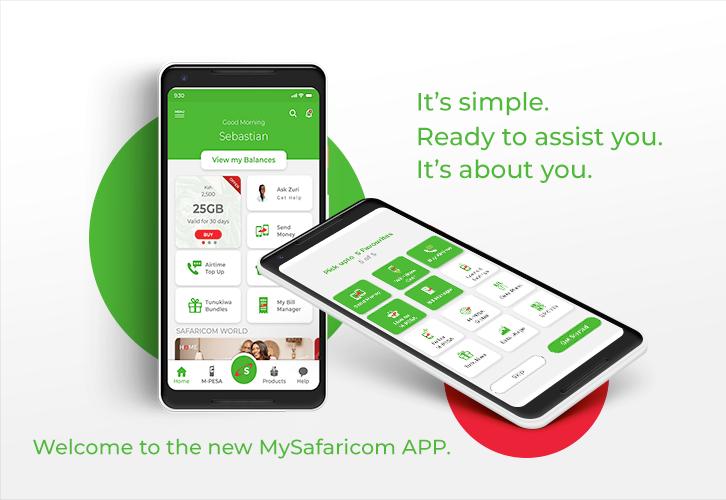
Telecommunications giant; Safaricom, has introduced two new really useful features with the latest update for its mySafaricom mobile application. Its users can now redeem Bonga points directly from the mySafaricom mobile application, and utilize one of the modern era’s safest security features; the Fingerprint protection.
With Fingerprint protection now available on the mySafaricom app, users will no longer have to worry about just anyone getting into the app via their mobile devices, and gaining access to valuable information like their Data bundle balance, airtime balance and of course their M-Pesa balance, without their say so.
The mySafaricom app also lets you purchase SMS bundles that can automatically be renewed every 24 hours. If you however would prefer to only purchase one-time SMS bundles without having to renew automatically, simply punch in *188# from your device’s browser.
Although Safaricom is not the only telecommunications company to have a mobile app, its mySafaricom application offers users a variety of useful and super convenient features and services. That fact coupled with its much higher subscriber base, has made it one of the most popular utility applications and one of the most popular mobile applications by a telecommunications company. Its over 3 million downloads, is a further testament to this.
This article will be highlighting said features and services for readers who are not already aware of or familiar with them.
With the mySafaricom app users can:
Get 500 Megabytes Free
Users who have never used the mySafaricom application at any point in time, will be given 500 Megabytes free of charge as soon as the application is installed.
While this may or may not expire after 24 hours, MpesaPay is sure that you might also see this as a really cool incentive to jump on board.
Again, this particular feature is only available to first time users.
Access Their M-PESA statements
By simply requesting, users can immediately view the M-Pesa statements including in depth insights on their transactions just like how M-LEDGER got the job done.
Cool right?
Scan Airtime Scratch Cards When Topping Up
With the mySafaricom mobile application whenever you purchase a recharge card or Airtime Scratch Card, you can just scan the 16 digits present on said card as opposed to manually typing them in. Once done, your airtime balance will automatically be updated to reflect the amount you purchased.
While a sizeable number of Safaricom users do not necessarily purchase physical Airtime Scratch Cards and opt for doing so via M-Pesa directly or their bank accounts, it is still a useful feature. Especially if for some reason, you do not have an M-Pesa account or a Bank Account.
Manage Their Bills
The mySafaricom app lets users handle their bills effectively via the Bill Management tool. With this tool users can view their bills on a single page and also add additional bills (including Kenya Power, Wireless Internet connection providers like Zuku, Faiba, etc), makes sure that you do not need to memorize the numerous paybill numbers you use to pay your bills (as they will always be readily accessible via the Bill Management tool), shows you the specific bills you use more and the bills you pay for the most.

Share M-PESA Transaction Messages
You know how when you have to send proof of M-Pesa payments, you usually have to either screenshot or copy the transaction message and then manually crop or edit your M-Pesa from said transaction message or statement for various reasons? Well thanks to the mySafaricom mobile application, that will be a thing of the past.
The mySafaricom mobile application, makes it possible for you to be able to share an M-Pesa transaction message or statement, without having to worry about it revealing your M-Pesa balance.
Read Newspapers Via The App
Earlier in the year a number of media establishments in Kenya decided to allow readers access their newspapers from the comfort of their mobile devices through strategic partnerships with Safaricom. Through these alliances, payments for said newspapers would be made in the form of airtime.
The new mySafaricom mobile application, is bringing this feature even closer to your fingertips. With the mySafaricom application and for only 20 Kenyan Shillings, you no longer need to use access codes in order to access said newspapers. All you need to do is access the Discover option within the application, and follow the instructions or prompts that pop up.
The newspapers users will be able to access, include those owned by Mediamax, Nation Media Group, Radio Africa Group, and Standard Group.
View Their Postpay Balances
To do this all a mySafaricom app user needs to do is, go to the home page and select the ‘View My Balances’ option. This means that users will no longer have to go through the ‘hassle’ of typing in various access numbers and USSD codes just so they can view and or access their PostPay balances.
Quite convenient yes?
Log Into Their mySafaricom Through A Wi-Fi Connection
One critical issue users have had with the mySafaricom mobile application is that you could only log into the application by using Safaricom’s mobile data plans. While Safaricom explained to users that the decision was carried out for security reasons it was still seen by a significant number of affected users, as an inconvenience. That however, will no longer be an issue.
The telecommunications giant has now made it possible for users to log into the mySafaricom through the use of a wireless internet (Wi-Fi) connection.
The only catch is that for Android users your device needs to be running on Android 9 Pie or previous versions as Android 10 and above, are not yet supported.

Please keep in mind that the above features are for the new mySafaricom mobile application (here is a direct link to it on Google’s Android Playstore – https://play.google.com/store/apps/details?id=com.safaricom.mysafaricom) and should have a ‘new’ badge on its Logo.
The new mySafaricom mobile application, is also available for download via Apple’s App Store. You can download the mySafaricom mobile application from Apple’s App Stores, by visiting this link – https://apps.apple.com/us/app/mysafaricom-app/id1481438147

Are there any other topics, news, devices, or categories that you would like us to write on? Feel free to reach out to Mpesa Pay in the comment section.
